
Per-Task Agent Routing
Route main chat, SpecWriter, Help, and the Assistant panel to different coding agents from Settings > Agents (v1.5.0).
The Agents tab in Settings (new in v1.3.0, expanded in v1.5.0) is where you see which coding-agent CLIs CodeMantis has detected and choose which one new sessions use by default. From v1.5.0 onward you can also route specific task categories — main chat, the Assistant panel, SpecWriter, Help — to different agents independently, splitting your workload (and your subscription pool) across Claude Code, Codex, and OpenCode.
Why Per-Task Routing Exists
From 15 June 2026, Anthropic moved headless usage of the Claude CLI — anything driven through claude -p or the Agent SDK, which is how Self-Drive, SpecWriter, and the in-app Help assistant talk to Claude under the hood — onto a metered credit pool that is separate from your interactive Claude Pro / Max subscription. Interactive chat (you typing into a session) still draws from the subscription as before; programmatic, headless chat now bills against credits. The OpenAI Codex CLI is unaffected — it keeps drawing from your ChatGPT Plus / Pro / Business subscription no matter how it's invoked.
The practical consequence: the same prompt can cost different things on different agents depending on whether you typed it or CodeMantis dispatched it on your behalf. Per-task routing lets you decide which pool each kind of work lands in:
- Keep Main chat on Claude if your hand-on-keyboard work feels more accurate there — it still draws from your interactive Claude subscription, unchanged by the billing shift.
- Route SpecWriter, Help, or the Assistant panel to Codex to push their heavier, often-headless traffic onto your ChatGPT subscription instead of Anthropic's credit pool.
- Or invert the split — keep iterative spec work on Claude and push Main chat through Codex if your ChatGPT plan has more headroom.
- Route any category to OpenCode to run it on a provider you configure, keeping that work off both vendor pools entirely.
The Usage split (last 7 days) panel reports honest session counts — not dollars, since CLI sessions are subscription-billed — so you can see where your traffic is actually landing. For the full decision framework, see Choosing Your Coding Agent.
Where It Lives
Open Settings › Agents (gear icon in the title bar, or press Cmd ,, then click the Agents tab).
What You See
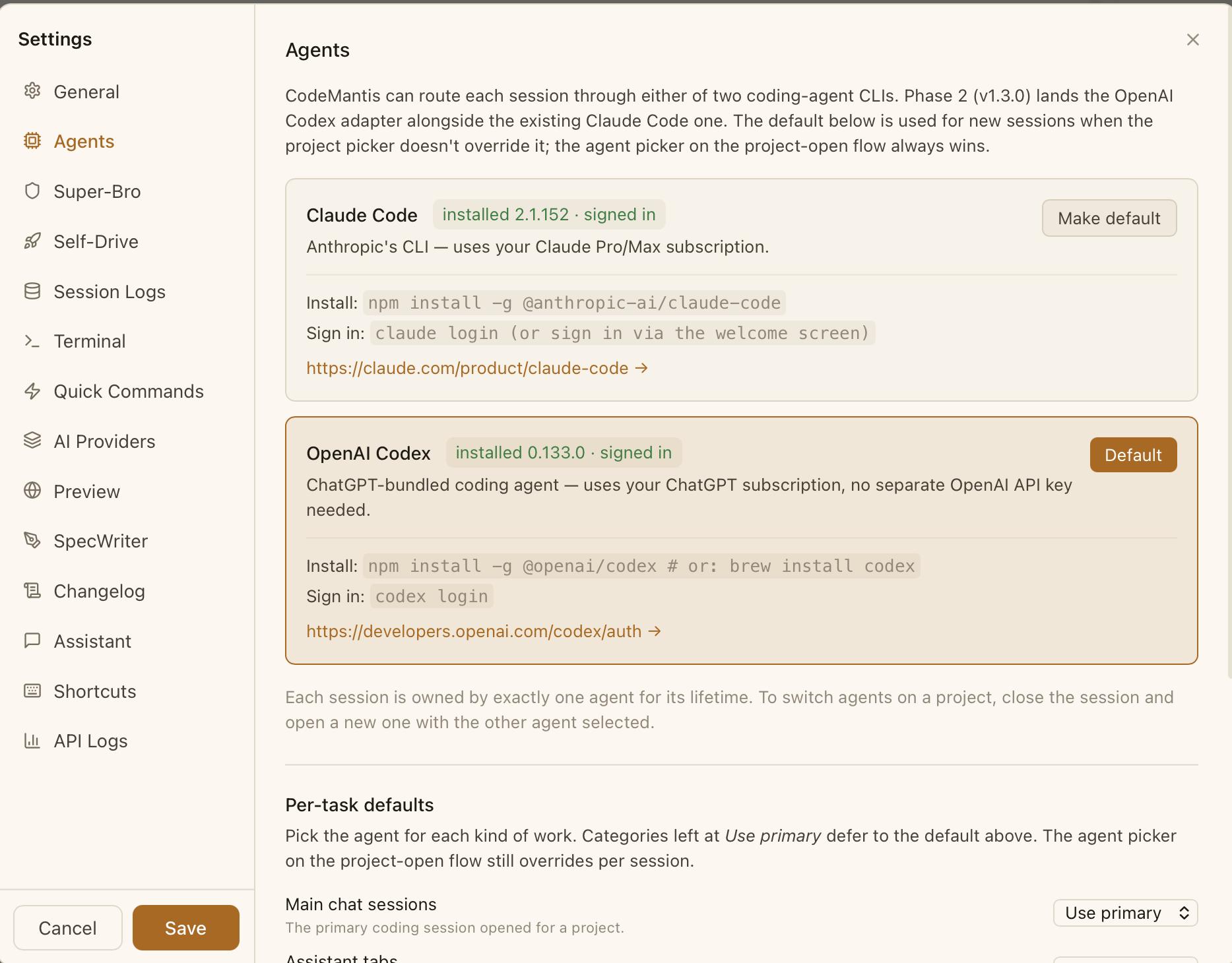
Per-agent status rows
One row per supported agent. Each row shows:
- An install badge — green "Installed (vX.X.X)" or red "Not installed" with the install command.
- An authentication badge — green "Logged in" or yellow "Sign-in required" with the sign-in command.
- A "Make default" button — promotes that agent to the primary
selectedAgentIdfor new sessions.
Per-task Defaults (v1.5.0)
Shown when more than one agent CLI is installed and signed in. A small table mapping task categories to agents:
| Task category | What it controls |
|---|---|
main_chat | The agent your main project sessions default to |
spec_writer | The agent SpecWriter hands off to when you click Implement |
assistant | The agent powering local-CLI assistant tabs in the right panel |
help | The agent powering the in-app Help assistant |
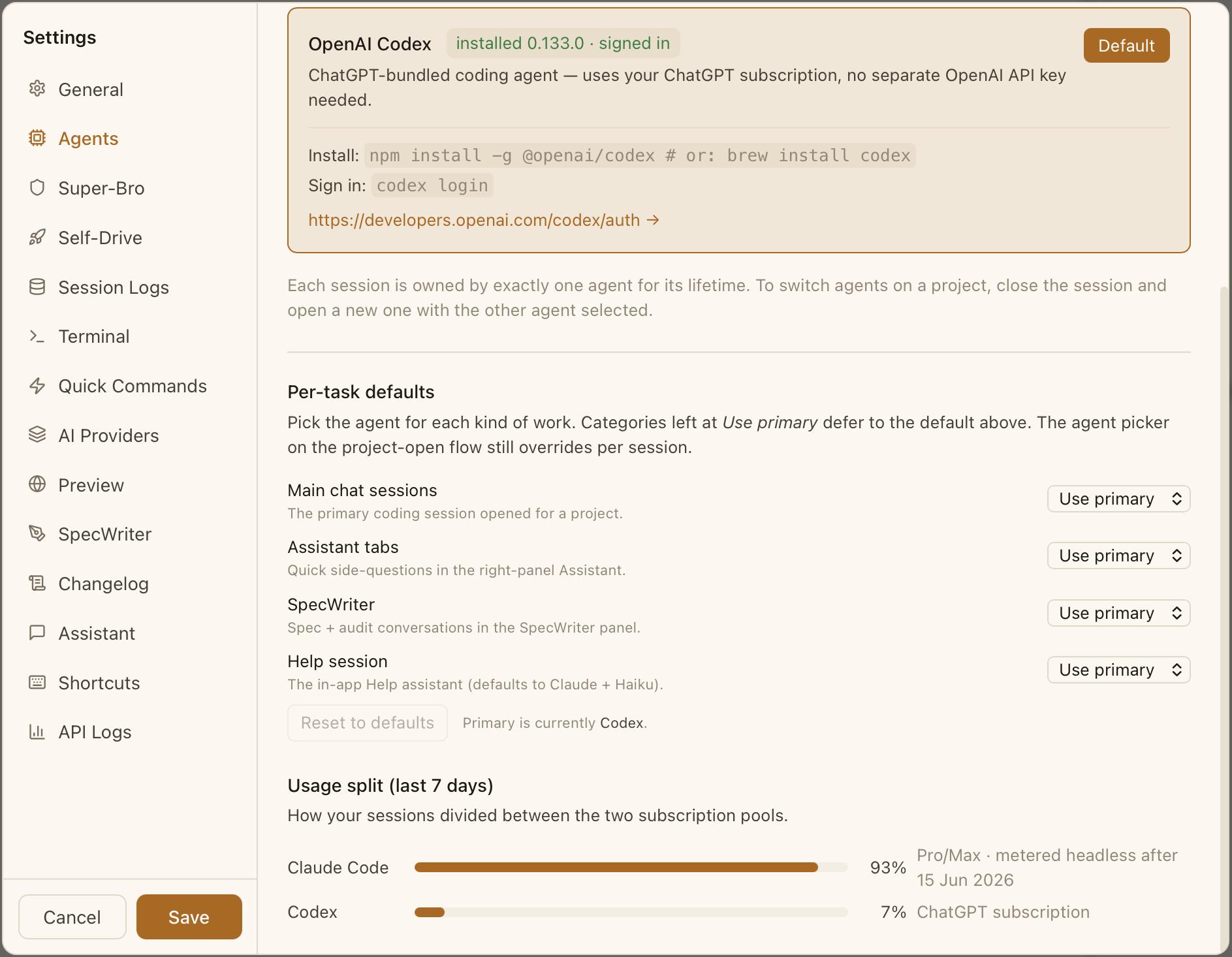
Each row is a dropdown listing every installed agent — Claude Code, Codex, and OpenCode — plus "Use primary" to inherit whichever agent you've made the default. The setting is persisted as a sparse map (defaultAgentByTask in settings) — categories you don't touch stay on "Use primary."
Self-Drive is not a task category. Self-Drive always inherits the agent of the session it attaches to. If your
main_chatis routed to Codex, Self-Drive runs on Codex too. The pre-run gate (Preflight) and orchestrator preamble still apply, but the agent is fixed by the underlying session. This is deliberate — Self-Drive's evidence vocabulary is calibrated per agent.
Usage split (last 7 days)
An AgentCostBreakdown card at the bottom of the tab shows, for the last 7 days:
- Per-agent token counts (input, output, cache read, cache write).
- An estimated-cost breakdown.
- A horizontal bar chart showing the Claude / Codex split.
Use this to see where your subscription pool actually goes and rebalance routing if either pool drains faster than expected.
User Actions
Route a task to a specific agent
In the Per-task Defaults table, change the dropdown for main_chat, assistant, spec_writer, or help to a specific agent. The change is persisted to defaultAgentByTask in settings.
Reset task routing
Change a dropdown back to "Use primary" to clear that category's entry from the map. The task will then follow whatever you've set as the default agent.
Change the default (primary) agent
Click "Make default" on the agent row you want as primary. This updates selectedAgentId in settings. Any task category set to "Use primary" will follow the new default immediately.
States
- Both installed: Both rows show green install + auth badges. Per-task Defaults table is visible.
- One installed: The other row shows "Not installed" with its install command. The Per-task Defaults table is hidden (it only makes sense when there is more than one agent to choose).
- One installed but signed out: Install badge is green but auth badge is yellow with the sign-in command. Sessions on that agent will fail at spawn time until you sign in.
- Neither installed: Both rows show "Not installed". Sessions cannot start at all (the Welcome Screen handles install guidance).
Configuration
- Settings path: Settings › Agents › Default agent →
selectedAgentId - Settings path: Settings › Agents › Per-task Defaults →
defaultAgentByTask(sparse map) - Internal: Detection IPC calls are
checkClaudeStatus()andcheckCodexStatus(). Both return{ installed, version, parsed_version, authenticated }.
Account Usage & Auto-Start After Reset
Routing decisions only pay off if you can see where each agent's quota actually stands. The Usage pill shows how much of your account's rolling usage window is consumed. With Settings › General › "Keep account usage fresh" enabled (the default), the numbers refresh automatically from query-only sources — Claude's get_usage and Codex's account/rateLimits/read — on a periodic interval (default every 2 minutes) and whenever a quota window resets, so they are real figures, not estimates.
Inside the Usage popover, the "Auto-start after reset" switch (off by default, Claude only) solves a subtle quota quirk: your fresh Claude 5-hour window normally only begins when you send your next message. With the switch on, CodeMantis fires a tiny Haiku prompt about one minute after each reset to claim the fresh window for you — so the clock starts even while you're away — and immediately reaps the throwaway session it used.
This pairs with Auto-continue, which arms an automatic continuation after a quota reset so a long task picks itself back up once the window reopens.
Why Route Per Task?
A common configuration: write specs with Claude (long-form reasoning), run hot main chat on Codex (cheaper subscription headroom), leave Help and Assistant on "Use primary." See Choosing Your Coding Agent for the decision framework and the blog post Why CodeMantis Now Supports Two Coding Agents (and Soon More) for the reasoning behind the design.
Multi-AI Assistants
Use the latest models from OpenAI, Google, and Anthropic alongside your main coding session — works with Claude Code or Codex.
OpenCode: The Universal ACP Adapter
Run OpenCode as a first-class coding agent in CodeMantis — open models through your own providers, driven through the Agent Client Protocol.